
Website restoration isn’t “copy the old content and press publish.” It’s a controlled process for keeping URLs, performance, forms, tracking, and search visibility stable while you change what’s underneath.
When you restore a site, the most expensive bugs are the ones you can’t see from the homepage.
If you’re restoring or relaunching a site, you’re probably asking: What tools should I use before I touch anything? How do I test the restored site so real user journeys don’t fail? And which SEO checks matter most when URLs or templates change?
According to Google Search Central, “redirects” and “canonical” settings are core signals for how search engines understand your URLs and pages. Meanwhile, Google Search Console is the practical place to monitor indexing and performance after changes. Those two realities-URL mapping plus monitoring-shape the tool stack for safe restoration.
In this guide, you’ll get a tool checklist across backups, testing, SEO, and content management-so you can build a restoration workflow that’s boring in the best way.
Quick glossary: restoration workflow basics
Inventory = a list of what exists now (URLs, templates, forms, scripts, assets). Mapping = a table that tells you what each old URL should become. Rollback = a fast way to undo changes if monitoring shows problems. QA (quality assurance) = testing that simulates how users actually navigate and submit forms.
1) Backup tools (so you can roll back, not “hope”)
Backups are only useful if you can restore them quickly and validate the restore. Your goal is a backup strategy that supports staging restores and rapid rollback when something breaks.
- Full site backups (files + database) before code/theme/plugin changes.
- Database-only exports when you need a fast revert for content tweaks.
- Staging environments that can be restored and tested without risking production visitors.
What to include in your backup test
Test these after a restore: log in as admin, load critical pages, validate menus and navigation, run a contact form submission, and check that tracking scripts still fire (even if you keep analytics quiet during testing).
2) Testing and QA tools (where restorations usually fail)
Page-by-page checking misses failure modes that only happen in user journeys: broken forms, search bugs, wrong redirect chains, mobile layout issues, and missing assets that load fine on desktop.
QA tools for restored sites
| Test area | Tooling you should have | Example check |
|---|---|---|
| Broken assets | Automated link/resource checks + browser devtools | Find missing CSS/JS/image URLs on key templates |
| Redirect correctness | Redirect mapping + crawler/validator | Old URL → correct destination (no chains, correct status codes) |
| Forms & integrations | Staging submissions + spam test harness | Contact form and any CRM/email routing actually works |
| Performance regressions | Core Web Vitals-style monitoring + page audits | Confirm images aren’t accidentally unoptimized |
| Mobile UX | Device/browser testing matrix | Menu works, CTAs visible, buttons tappable |
| Tracking accuracy | Tag audit + test conversions | Key events fire exactly once on the correct pages |
Tip: build a “critical journey” list (e.g., landing page → internal navigation → contact form submit) and treat it like a test suite. If you can automate it later, great. If not, at least make it repeatable.
3) SEO tools for restoration (keep signals consistent)
For SEO-safe restoration, the tools exist to prevent two things: URL confusion (search engines don’t know which page to index) and monitoring blindness (you can’t detect issues soon enough).
Core SEO checks (tool-backed)
- Indexing visibility: use Search Console to watch coverage and performance trends.
- URL discovery: verify sitemap.xml and robots.txt behave as intended.
- Canonical consistency: confirm canonical tags match the final intended URL.
- Redirect quality: ensure legacy URLs resolve to correct destinations.
- On-page hygiene: titles/meta, heading structure, and image alt text remain coherent after template changes.
Helpful references: Google Search documentation on crawling and indexing and Search Console help for performance and indexing reports. (Both links include your site tracking parameter.)
If you’re changing a lot of templates, keep your SEO work structured: freeze URL mapping first, then test a small set of templates and only expand once monitoring looks healthy.
4) Content management tools (the “edit without breaking” layer)
Content management isn’t just “write posts.” During restoration, it’s about keeping content consistent with the restored design, navigation, and templates-especially when legacy pages had different structure.
What to use for safe content edits
- Version control for content-related assets (themes, custom blocks, reusable templates).
- Staging-first publishing for any changes that affect public navigation.
- Structured content workflow (draft → review → QA → scheduled publish if needed).
- Media management to ensure images remain optimized and alt text stays accurate.
When in doubt, treat content like software: you’re managing state. If you can’t roll it back quickly, it’s not safe enough.
5) A restoration “tool stack” you can assemble in one day
Here’s a practical setup that covers most restoration scenarios:
- Backup + staging restore (files + database, tested restore run).
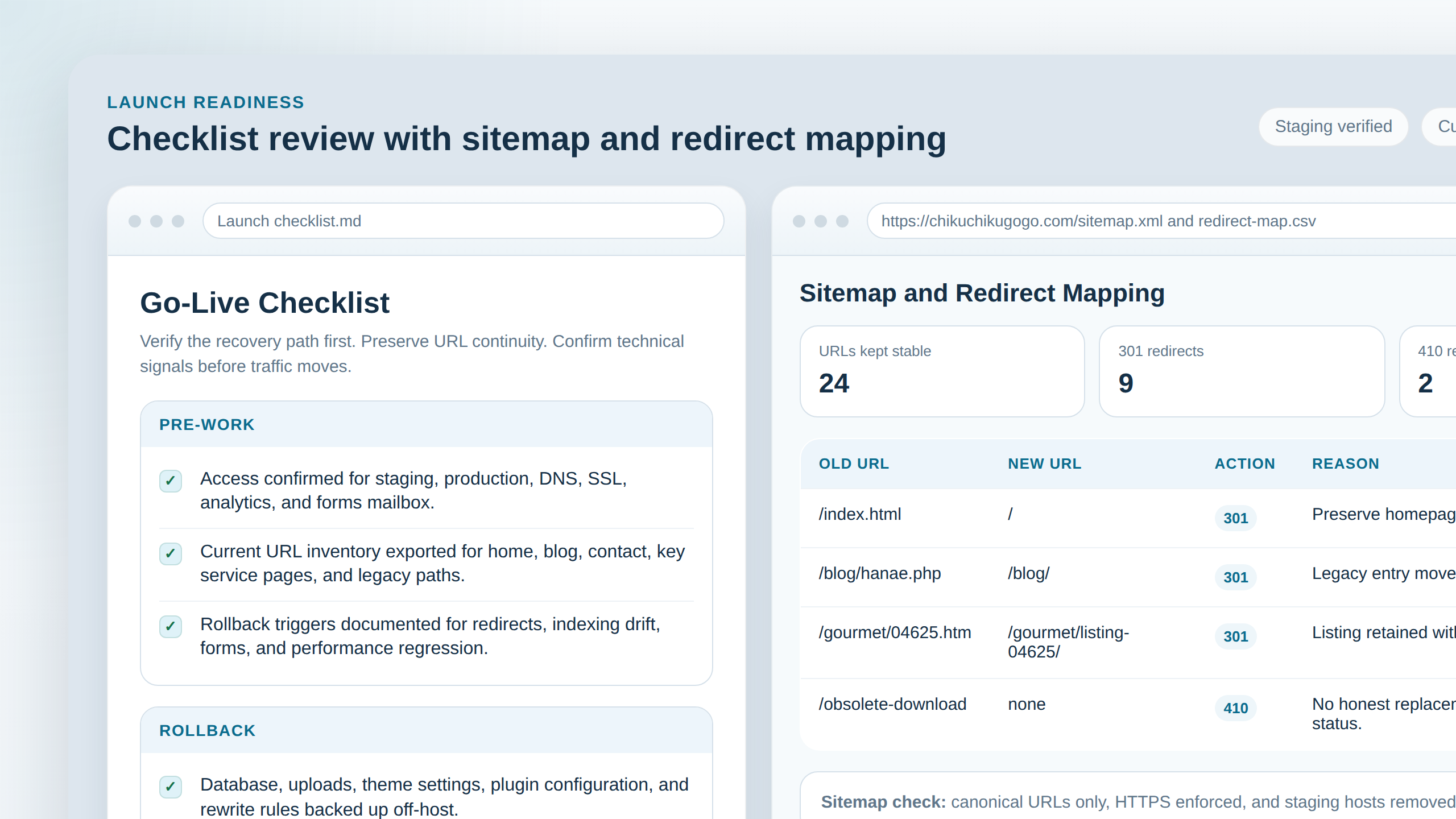
- URL mapping sheet (old URL → new URL + expected status code).
- QA checklist for critical journeys (forms, navigation, assets).
- SEO monitoring plan using Search Console before/after launch.
- Media and content workflow with staging-first edits.
Small prototype first: restore one representative template + one internal flow, run the QA journey, verify redirects, then expand. That reduces the chance that the site “works on the surface” while the real user path is broken.
Conclusion: build a workflow, not a pile of tools
The best restoration tool stack is the one that makes the correct actions easier than the risky ones: back up and test restores, map URLs, run user-journey QA, monitor SEO signals after launch, and manage content through a staging-first workflow.
If you want to go one level deeper, browse our blog for related guides, or start from the homepage.
Quick checklist: backup tested? URL mapping ready? QA journeys passed? Search Console monitoring in place? Media optimized? If yes, you’re restoring with leverage-not luck.