
I can usually tell where a site update went wrong by the first dead link I find. The symptom is almost always boring. The consequences are not: bookmarks break, backlinks land in the void, and a redirect chain quietly adds one more dumb delay to the trip.
Readers usually come here with the same questions, just with different levels of panic:
- Which old URLs should point to a new page, and which ones should be left alone?
- How do I keep SEO value when page names, folders, or content structure change?
- What belongs in a mapping spreadsheet so I do not create a mess with confidence?
- How do I test redirects before the public and search engines start auditing my optimism?
The basic rule has been stable for a long time: cool URIs do not change. The problem is that real sites do change. That is why Google’s guidance on 301 redirects, canonical consolidation for duplicate URLs, and MDN’s overview of HTTP redirections matters here. The boring answer is still the correct one: decide the destination, document it, test it, and stop inventing drama with a chain of redirects.
That is the whole job in one sentence. The rest of this article shows the part people skip because it looks too much like work.
If you want the broader site context while you read, keep the home page, About page, blog index, and contact page nearby. They are useful not because they are clever, but because navigation is supposed to be useful.
Terms I am not going to pretend are mysterious
Before I talk about workflow, I want the terms pinned down. Most redirect mistakes start when people use vague language and then act surprised when the server responds literally.
- Source URL: the old address people still request.
- Destination URL: the current page that should answer the same need.
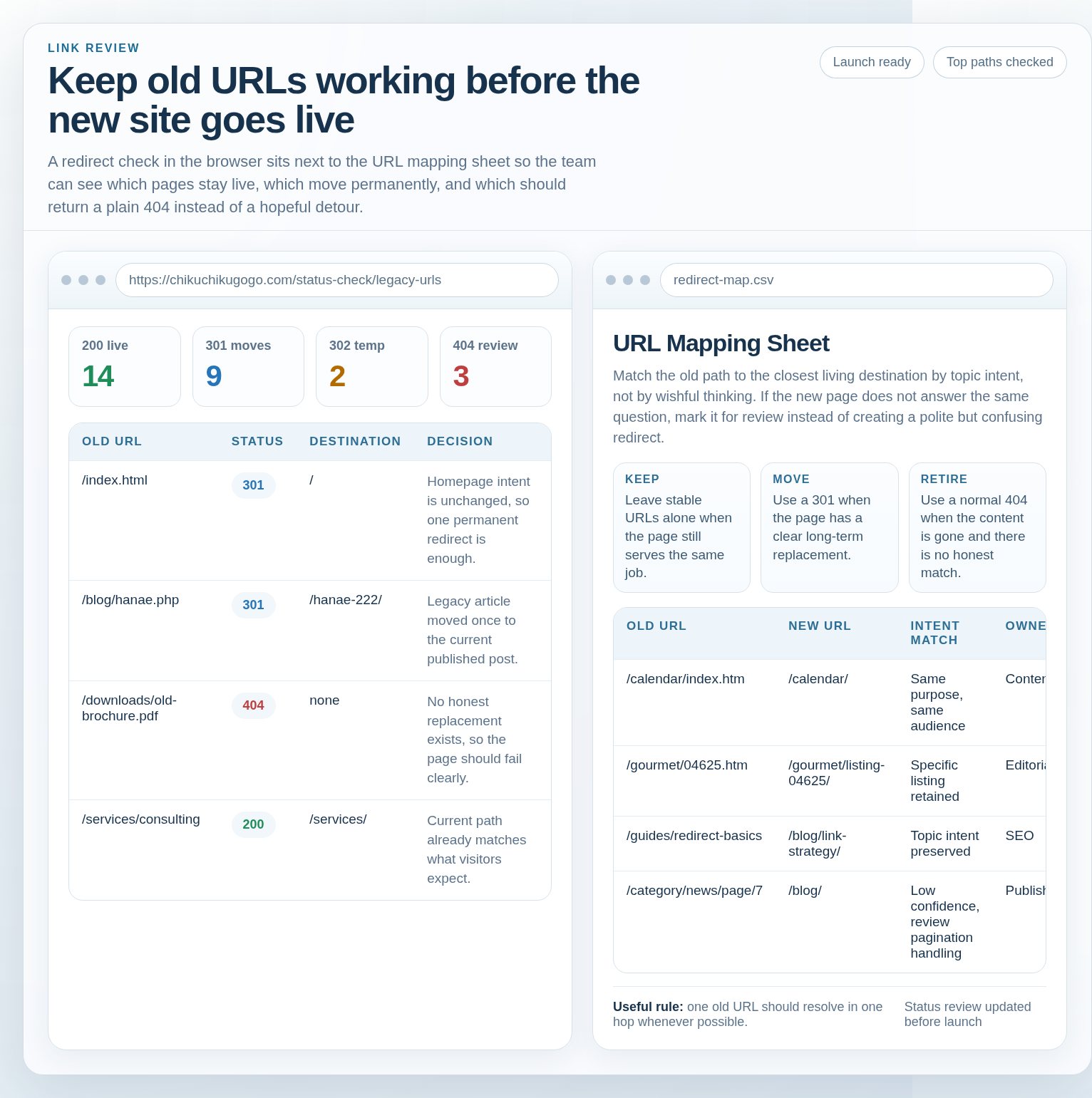
- 301 redirect: a permanent move. Use this for stable replacements.
- 302 redirect: a temporary move. Use this only when the original URL is expected to come back.
- Canonical URL: the preferred indexable version of a page when multiple URLs show similar content.
- Redirect chain: one redirect followed by another, then maybe another, because nobody wanted to make a final decision.
- Soft 404: a page that looks like an error to search engines even though the server tries to appear helpful.
Useful rule: if you cannot explain why a given old URL should land on a specific new URL, you probably do not yet have a mapping strategy. You have a guess with a spreadsheet costume.
Why URL mapping matters during a site update
URL mapping is not about being precious with old links. It is about preserving continuity. People bookmark pages. Other sites link to them. Search engines remember them. Email newsletters, PDFs, printed materials, and social posts do not update themselves just because a redesign happened.
That means every changed URL creates three risks:
- User loss: a bookmark or shared link lands on a dead end.
- Link loss: a backlink no longer transfers value to the right destination.
- Indexing confusion: crawlers may spend time on the wrong URL if the signals are messy.
If you need a second outside reference point while you make decisions, Google Search Central’s pages on redirects and duplicate URL consolidation are the least glamorous but most useful documents in the room. That is usually how you know they are worth reading.
The practical goal is not to save every old URL. The goal is to save the ones that still matter, and to retire the rest honestly instead of forcing them through whatever page is nearby.
Choose your target rules: keep, consolidate, or rename
I start every mapping job with a decision tree. Not because I enjoy process theater, but because it prevents the classic mistake: redirecting everything to the homepage and calling it “covered.”
Decision tree
- Does the page still exist in basically the same form? Keep the URL if the slug is already clear and stable.
- Does an older page now belong inside a broader, better page? Consolidate with a 301 to the closest true replacement.
- Is the page still needed but under a cleaner name or folder? Rename it and map the old path directly to the new one.
- Is the page gone with no meaningful replacement? Return a normal 404 or 410 and give visitors a sane way back into the site.
That is the decision model. Everything else is detail work.
| Situation | Best action | Why this is the least stupid option |
|---|---|---|
/index.html becomes / |
301 redirect | The homepage intent has not changed; only the format has. |
| An old article is updated and republished under a better slug | 301 redirect | The reader still wants the same answer, just through a cleaner route. |
| A seasonal campaign page is temporarily hidden during maintenance | 302 redirect | The original is expected to return, so the move is temporary. |
| A retired page has no real successor | 404 or 410 | Honesty beats fake relevance. |
Do not redirect a page just because it has backlinks. If the destination does not match the original intent, you are not preserving value. You are laundering disappointment.
Create a URL inventory before you touch redirects
I do not trust memory on this job. Nobody remembers the full set of URLs that matter, and the ones people forget are usually the ones that have the best backlinks or the weirdest campaign history.
Your inventory should pull from multiple places:
- Current and old XML sitemaps
- Top landing pages from analytics
- Backlink exports from SEO tools
- Internal links in menus, footers, and article bodies
- Server logs, if available
- Emails, PDFs, and other documents that still circulate public links
Then sort the list into practical buckets:
- Must-keep: pages with strong backlinks, bookmarks, or obvious business value.
- Keep if possible: useful pages with decent traffic but weaker backlink equity.
- Consolidate: thin duplicates, near duplicates, or older versions of the same topic.
- Retire: pages that have no replacement and no real audience left.
For a site with a lot of operational links, I like to keep one shared sheet for the entire process instead of letting the inventory fragment across random notes. If the sheet starts behaving like an app instead of a file, a neutral web app generator can be useful for turning the mapping list into a simple review queue. That is not magic. It is just a less fragile way to track who approved what.
Example inventory row:
| Source URL | Traffic / backlinks | Intent | Action | Destination URL |
|---|---|---|---|---|
/services-old.html |
High backlinks, low traffic | Service overview | 301 | /services/ |
/calendar/index.htm |
Low traffic, recurring references | Calendar / event listing | 301 | /calendar/ |
/old-post.php?id=47 |
Moderate backlinks | Article topic moved | 301 | New article URL |
Build a mapping spreadsheet that prevents mistakes
This is where the work turns from theory into something that can actually be reviewed. I want a sheet with columns that answer the questions a developer, editor, or SEO reviewer will ask before launch.
| Column | Why it belongs there |
|---|---|
| Source URL | The old address that may still receive traffic or links. |
| Destination URL | The final page that should answer the request. |
| Redirect type | Usually 301 or 302. No, “maybe” is not a redirect type. |
| Reason | Explains why the mapping exists and whether the intent matches. |
| Owner | Makes somebody accountable when the row is wrong. |
| Status | Draft, approved, implemented, tested, or rejected. |
| Notes | Useful for exceptions, query strings, case issues, or temporary rules. |
The spreadsheet is not decoration. It is the control surface. If the map is sloppy, the redirects will be sloppy. That is not a philosophical point. It is a mechanical one.
A few rules save time:
- Map one source URL to one final destination wherever possible.
- Avoid sending multiple source URLs through one generic page unless the intent truly matches.
- Write the final URL exactly as it should resolve, including slash conventions.
- Mark rows that require manual checks, such as query-string handling or legacy case variants.
- Review the sheet with whoever owns content, development, and SEO before anything goes live.
Example of the kind of mistake I keep finding: an old article URL gets redirected to a newer article, but the newer article is later merged again into another page. The first redirect still exists, the second redirect now exists, and suddenly the old link takes a scenic route through two intermediate pages. That is a chain. Chains are for bikes, not URLs.
Redirect best practices
Once the mapping is approved, the redirects themselves should be boring. If they are exciting, something is probably wrong.
Use 301 for permanent moves
Use a 301 when the old page is not coming back and the new page should receive the signal long term. That includes changed slugs, folder moves, protocol normalization, and merged content that now lives in one permanent location.
Use 302 only for temporary moves
Use a 302 when the original URL is expected to return after maintenance, a short campaign swap, or a temporary testing window. If you are not sure, treat the decision as permanent or stop and verify the plan. “Temporary forever” is one of the classic lies of web operations.
Avoid redirect chains
Each extra hop adds delay and another place for something to break. A clean mapping points the source directly at the final destination. If the old URL points to a URL that then points to another URL, the fix is not “good enough.” The fix is to remove the middle step.
Normalize trailing slashes and case
Decide whether your site uses trailing slashes and apply the rule consistently. Decide how uppercase and lowercase paths should behave. Then normalize the non-preferred variants into the preferred one. Inconsistent URL formatting creates duplicates, and duplicates create crawling noise.
For the underlying technical language, MDN’s redirections guide is a clean reference. It will not do the work for you, which is why it is useful.
| Issue | Preferred handling | Why |
|---|---|---|
/Page vs /page |
Redirect case variants to the canonical version | Prevents split signals and accidental duplicates |
/about vs /about/ |
Pick one canonical form and redirect the other | Consistency keeps internal links and canonical tags aligned |
http:// vs https:// |
301 to HTTPS | One secure version should win, not both |
Canonical and indexability checks
Redirects solve the visitor path. Canonicals solve the indexing preference. They need to tell the same story. If they disagree, search engines get to enjoy a mystery they did not ask for.
Check these items on every important template:
- The canonical tag points to the final indexable URL, not the old one.
- Internal links use the preferred destination URL, not a redirected variant.
- The XML sitemap lists only pages you want indexed.
- Parameterized or filtered views do not pretend to be primary pages.
- Redirected URLs are not also being presented as canonical targets anywhere else.
Google’s guidance on duplicate URL consolidation is the cleanest reference for this part of the job. If your implementation ignores the canonical tag while relying on redirects alone, you are leaving half the problem untouched.
Simple rule: if a page has a new permanent URL, the redirect should point to it and the canonical should usually point to it as well. The same final destination should win everywhere the site speaks.
Edge cases checklist
This is where the neat story gets messy. Real sites have legacy quirks, and those quirks have habits.
Query strings
Decide what to do with tracking parameters, filters, sort options, and old campaign IDs. Some should be ignored, some should be normalized, and some should be preserved only when they change the actual content meaning. The wrong choice here creates duplicate paths and strange indexing behavior.
Pagination
Paginated archives and listing pages need consistent handling. Do not blindly point every old page of a series to page 1 if a later page still has useful content. If the series is gone, decide whether the final destination should be a broader archive or a clean 404.
Deleted categories
If a category disappears, redirect it only to a page that truly covers the same topic. If there is no good replacement, let the category die cleanly. A category page is not automatically a synonym for the homepage, no matter how often people attempt that little fraud.
Renamed posts
When a post gets a new slug, use a direct 301 from the old URL to the new one. Do not leave the old URL in old menu items, related posts, or sitemaps. Otherwise you get one fixed problem and three new ones.
Legacy file extensions
Old .php, .htm, and .html paths often need normalization. Map them directly to the new canonical version instead of relying on a broad catch-all rule that may redirect too much.
| Edge case | Best first question | Likely action |
|---|---|---|
| Query string on an old campaign URL | Does the parameter change content or just tracking? | Normalize or preserve only what matters |
| Pagination in a retired archive | Is there still meaningful page-specific content? | Redirect to the nearest equivalent or return 404 |
| Deleted category | Is there a true topic match elsewhere? | Consolidate only if the match is real |
| Renamed post | Has the article content actually moved? | Direct 301 to the new permalink |
QA workflow before you go live
Testing is where the honest version of the plan appears. If you only inspect the spreadsheet, you have not verified anything. You have admired your intentions.
I test redirects in two ways: in a browser and in the terminal. The browser confirms the human experience. The terminal confirms the status code.
Browser checks
- Open a sample of old URLs directly.
- Confirm the destination is the final URL, not another hop in a chain.
- Check that the page content matches the original intent.
- Watch for layout issues, missing assets, or broken internal links on the destination page.
curl checks
- Verify the response code is 301 for permanent redirects.
- Confirm the
Locationheader points straight at the final URL. - Check for extra hops, loop behavior, or protocol mismatches.
- Test a few variants: with and without slashes, uppercase and lowercase, old folders and new ones.
Here is a simple spot-check pattern:
curl -I https://example.com/old-url
curl -IL https://example.com/old-url
If the first command gives you one redirect and the second exposes three, you already know where the problem is.
For readers who want a practical site-performance checkpoint while they test the live paths, Google’s Core Web Vitals guidance is a clean reference. It will not replace QA, but it will help you tell the difference between “works” and “works badly.”
Quick pre-launch checklist:
- Every mapped URL resolves directly to its intended destination.
- No redirect chains remain in the high-priority rows.
- Canonical tags match the final destination URLs.
- Internal links point to the final URLs, not the redirected versions.
- Important missing pages return a proper error, not a fake substitute.
- The sitemap contains final URLs only.
- The blog index still works and surfaces current posts.
Post-launch monitoring
After launch, the job is not finished. It just changes shape. Your aim for the next 7 to 30 days is to catch the failures that only appear when real users and crawlers start hitting the site at scale.
Watch these signals:
- 404 spikes: usually means a mapped URL was missed or an internal link still points at the old path.
- Redirect errors: usually means a chain, loop, or bad rule slipped through.
- Indexing changes: if the wrong URLs start appearing, canonical and sitemap rules need another pass.
- Traffic to old URLs: if significant volume still hits legacy paths, the redirects need to stay in place.
- User complaints: they are early warning, not anecdote. Treat them that way.
Google Search Console and analytics are the obvious monitoring pair, but the real skill is deciding what to do when the numbers move. If a 404 pattern appears, update the mapping sheet, fix the redirect, and remove the broken internal link at the source. Do not just keep adding redirects on top of redirects because the error feels lonely.
Suggested monitoring rhythm:
| Window | What to check | What action usually follows |
|---|---|---|
| Day 1-3 | Direct redirect tests, homepage links, sitemap integrity | Fix obvious misses fast |
| Day 4-7 | 404 patterns, redirect chains, canonical drift | Patch rules and update internal links |
| Week 2-4 | Indexing trends and old URL traffic | Clean up anything still leaking signal |
If the mapping is large or shared across multiple people, keep one review board instead of five half-finished copies. A simple internal tracker is enough. A better one is useful when the review state starts to matter more than the sheet cells. That is usually when the process graduates from “file” to “workflow.”
A blunt closing checklist
If you want the shortest possible summary, here it is:
- Inventory the old URLs first.
- Decide keep, consolidate, rename, or retire on purpose.
- Map by intent, not by accident.
- Use 301s for permanent moves and 302s only when temporary is actually temporary.
- Keep canonicals, internal links, and sitemaps aligned with the final destination.
- Test with a browser and with curl before launch.
- Monitor the first month like the site depends on it, because it does.
I do not trust a site update until the old links behave, the new pages answer the right questions, and the redirect map contains fewer surprises than the average inbox. That is not perfection. It is just competent operations, which remains underrated in public.
If you need a next step after this, start by exporting your current URLs and marking the ones that still matter. The first useful diagnosis is always the same: find the real inventory, then stop guessing.