
Old URLs rarely fail in dramatic ways. More often, they fail quietly: a bookmarked page becomes a 404, a valuable backlink lands on the wrong topic, or a redirect sends visitors through two unnecessary hops before they reach something almost relevant.
Readers usually arrive here with a cluster of practical questions:
- How do I keep old links working when I change page names, folders, or blog structure?
- Which URLs deserve a redirect, and which ones should simply return a clean 404?
- What is the difference between a 301 and a 302 in real launch work?
- How do I check the result before search engines and visitors discover the mistakes for me?
Tim Berners-Lee put the underlying principle plainly in “Cool URIs don’t change”. In the real world, of course, URLs do change. Sections get merged, file-based paths become cleaner permalinks, and old resource libraries are retired. That is why the available guidance from Google Search Central on redirects and MDN’s overview of HTTP redirections matters so much: the problem is common, but the fix depends on intent, status codes, and careful validation rather than wishful thinking.
In this guide, I will walk through a practical link strategy for site updates: why old URLs break, how to define redirect scope, how to build a URL mapping workflow, when to use 301 versus 302 redirects, how to handle near matches without misleading visitors, and what to monitor after launch. If you want broader context while you work, keep the home page, About page, Services page, blog, and contact page within reach.
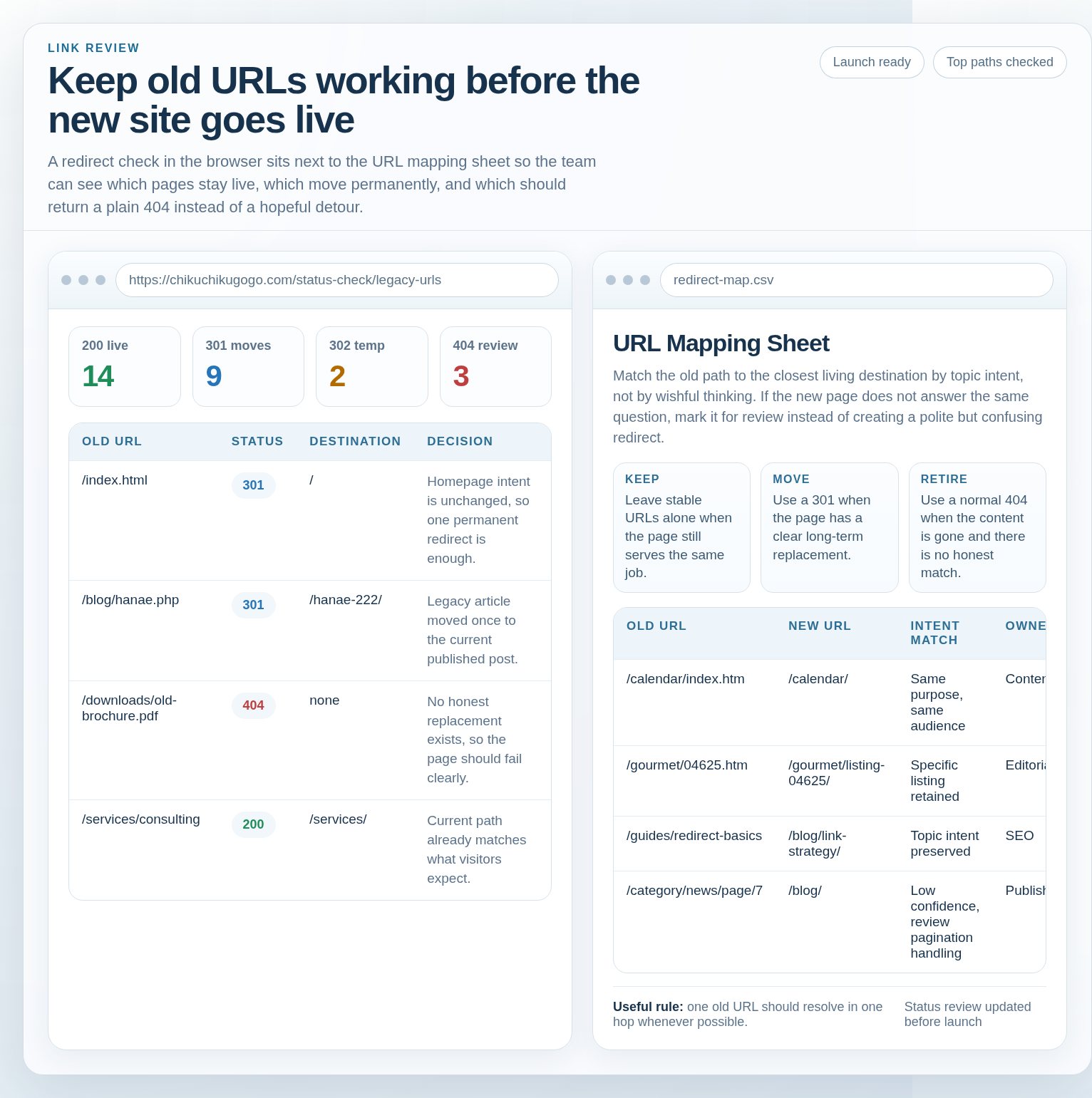
Terminology that matters before you touch redirects
A few definitions make the rest of the work easier:
- Old URL: any path that visitors, bookmarks, search engines, emails, PDFs, or backlinks may still request.
- Destination URL: the current page that should answer the same question or satisfy the same intent.
- 301 redirect: a permanent move. Use it when the old page has a stable long-term replacement.
- 302 redirect: a temporary move. Use it when the change is short-lived and you expect the original URL to come back.
- 404 response: the server is honestly saying the page is not there. This is often better than redirecting every orphaned URL to the home page.
- Redirect chain: one redirect leading to another, then another. Chains waste crawl attention and slow people down.
The useful takeaway is simple: a good redirect strategy preserves meaning, not just traffic. If the destination does not answer the same need, the redirect is probably wrong even if it technically works.
Why old links break during site changes
Old links usually break for ordinary reasons, not exotic ones. A redesign introduces shorter slugs. A CMS migration removes file extensions like .html or .php. A blog category is folded into a broader resource hub. Someone deletes a low-performing page and assumes nobody will notice. Someone else changes a folder name because it “looks cleaner.” Months later, bookmarks, backlinks, and old campaign URLs are still asking for the original path.
I usually see three broad causes:
- URL structure changes. Example:
/resources/seo-basics.htmlbecomes/blog/seo-basics/. - Page moves. Example: a service page is merged into a broader solutions page.
- Removed sections. Example: a dated event archive or discontinued product line no longer exists.
These changes are not automatically bad. They become risky when nobody decides, URL by URL, what the new response should be. **The failure point is usually not the redesign itself. It is the missing map between the old structure and the new one.**
| Change type | Typical risk | Better response |
|---|---|---|
| Folder or slug cleanup | Old bookmarks and backlinks hit a 404 | Create a direct 301 from the old page to the new equivalent |
| Page merged into a broader section | Visitors land on a page that is too general | Redirect only if the broader page still solves the same task |
| Removed content with no replacement | Homepage redirect hides the loss and confuses visitors | Return a normal 404 or 410 with helpful navigation options |
Plan the redirect scope before you write rules
One of the easiest mistakes is assuming every old URL should redirect somewhere. It should not. A redirect is a promise that the new page is the right next stop. If the best available page is only vaguely related, the redirect creates a softer but more frustrating failure.
I use three tests when deciding whether an old URL deserves a redirect:
- Intent match: does the new page answer the same basic question?
- User expectation: would a reasonable visitor understand why they landed there?
- Business continuity: is the old URL tied to backlinks, bookmarks, email campaigns, documentation, or repeat traffic that still matters?
If the answer is yes across those tests, a redirect is usually appropriate. If the destination only shares a broad topic, pause. A redirect is not a witness protection program for random pages.
A clean 404 is often the honest answer when content has been removed, replaced by policy, or was never important enough to recreate. The goal is not to prevent every error code. The goal is to prevent unnecessary dead ends and misleading detours.
A practical redirect scope matrix
| Old URL situation | Best action | Why |
|---|---|---|
| Same page, new slug | 301 redirect | The content and intent are still essentially the same |
| Page merged into a closely related destination | 301 redirect | Visitors still reach the right answer with minimal friction |
| Temporary campaign, maintenance, or short-term test | 302 redirect | The move is temporary and the original may return |
| Retired content with no true replacement | 404 or 410 | Honest failure is better than irrelevant routing |
Build a URL mapping workflow you can actually maintain
The best redirect plans are boring in the right way: they are explicit, documented, and easy to review. I recommend building a spreadsheet or simple table before anyone starts adding redirect rules.
Start with sources for old URLs:
- XML sitemaps and old crawl exports
- Top landing pages from analytics
- Backlink exports from your SEO tools
- Important URLs mentioned in ads, PDFs, newsletters, or documentation
- Server logs if you have them
Then sort those URLs by importance. I like this sequence:
- High-value pages: top landing pages, service pages, resources, and URLs with strong backlinks.
- Navigation-level pages: category pages, hub pages, and major archives.
- Long-tail legacy pages: older articles, filtered views, old detail pages, and campaign URLs.
For each row, map by topic intent, not by string similarity. A page called /pricing-enterprise-2019 does not necessarily belong on today’s /about/ page just because both happen to sit under the same menu branch.
Simple URL mapping template
| Old URL | Current status | New URL | Action | Reason | Owner |
|---|---|---|---|---|---|
| /index.html | 200 before launch | / | 301 | Homepage intent stays the same | Web team |
| /blog/spring-campaign.php | 200 before launch | /blog/seasonal-campaign-guide/ | 301 | Updated article covers the same topic | Editorial |
| /downloads/old-checklist.pdf | 200 before launch | none | 404 | No current replacement | Content |
Notice what this template does: it forces a decision, gives a reason, and shows who owns the answer. **If nobody owns the row, the row is not really decided.**
Redirect types that matter: 301 vs. 302
The distinction is simpler than it sometimes sounds:
- Use 301 when the move is intended to be permanent.
- Use 302 when the move is temporary and the original URL is expected to return.
That sounds obvious, but many launches still end up with 302 redirects for permanent moves because a temporary configuration “was good enough for now.” It rarely stays temporary for long.
Use a 301 for cases like:
- switching from file-based URLs to cleaner permalinks,
- merging an old article into a newer updated version,
- moving a service page to a new stable slug,
- standardizing non-www to www, or HTTP to HTTPS.
Use a 302 for cases like:
- temporary maintenance routing,
- short-term campaign swaps,
- brief testing windows where the original page is coming back.
If you are unsure whether the change is permanent, ask a blunt question: six months from now, do I expect the old URL to return as the main live page? If the answer is no, a 301 is usually the cleaner choice.
Handling near matches without misleading visitors
Near matches are where most redirect strategies get messy. The old page is not available, but the team feels pressure to send the visitor somewhere. Sometimes the closest living page is good enough. Sometimes it is not.
I look for the closest surviving page that preserves the original task:
- If the old page was a specific service, redirect to the current service page, not the general About page.
- If the old page was a category archive, redirecting to the current category or resource hub may make sense.
- If the old page was a paginated archive page like
/category/news/page/7, redirecting everything to page 1 is often a weak fallback. Sometimes the better answer is to let the old deep page retire. - If the old page was a discontinued detail page with no current equivalent, do not force it onto a broad landing page just to avoid a 404.
The rule I trust most is this: a redirect should still feel fair after the first click. If a visitor would reasonably think “this is not what I asked for,” the mapping needs work.
Two quick examples of a good call and a bad one
Good call: an old guide at /blog/wordpress-launch-checklist.html now lives at /website-launch-day-runbook-60-minute-checklist/. The new article covers the same launch-stage problem with fresher structure and similar intent. A 301 makes sense because the visitor is still looking for launch guidance and the new page delivers it.
Bad call: an old resource about redirect planning is retired, and the team sends that URL to the contact page because “at least the user can ask us.” That may sound helpful, but it breaks intent. Someone looking for technical guidance did not ask for a contact form. In that case, a better answer is either a tightly related article or a clear 404 page with paths back to current resources.
These examples seem small, but they capture the larger principle: redirect decisions are editorial decisions as much as technical ones. A server rule can move a request. Only a good content decision can preserve usefulness.
Redirect chains and loops: find them before launch
A redirect chain happens when one old URL points to an intermediate URL, which then points to the final one. A loop is worse: the request circles back on itself and never lands properly.
These problems often appear when a site has gone through several rounds of edits. An old rule still points to last year’s slug, and the new system adds another redirect on top. The result “works” in a browser after extra hops, so nobody notices until performance reviews, crawl diagnostics, or user complaints surface the issue.
Two practical rules keep this under control:
- Point old URLs directly to the final destination whenever possible.
- Audit existing redirect rules before adding new ones.
When you test, look at the full path of the response, not just the final page. One request should ideally become one decision: 200, 301 to the final URL, 302 for a temporary move, or 404 for retired content.
Validation checklist before you publish
This is the stage many teams rush, even though it is where preventable mistakes are cheapest to find.
I recommend checking at least the following before launch:
- Crawl or sample the old URL list. Focus first on top landing pages, high-value backlinks, and known bookmarks.
- Spot-check critical routes manually. Home, service pages, flagship articles, contact paths, and any URL used in campaigns or documentation should be reviewed by hand.
- Check redirect hops. Confirm that important URLs resolve in one hop where possible.
- Review canonical and final destination URLs. Make sure the destination page reflects the live preferred version.
- Test key user paths. If a visitor lands from an old URL, can they still navigate naturally from there?
The Search Console Page indexing report is useful after launch, but it is even more useful when you have already done the manual work and know what “correct” should look like.
Redirect QA sign-off list
| Check | Pass condition | Owner |
|---|---|---|
| Top legacy URLs tested | Each returns the intended 200, 301, 302, or 404 | SEO or developer |
| No chains on priority pages | Old URLs resolve in one hop where possible | Developer |
| Destination pages make sense | Visitor intent is preserved after the redirect | Content owner |
| Internal links updated | New site navigation points to live current URLs | Editorial |
| Error handling reviewed | 404 page is clear and offers next steps | UX owner |
Post-launch monitoring for the first 30 days
Publishing is not the end of link management. It is the start of evidence gathering. During the first month, monitor the launch like a live system, not a completed checklist.
I would watch four things closely:
- Search Console signals: indexing changes, not found pages, and unexpected coverage shifts.
- Server logs or hosting logs: repeated requests for old paths you did not map, or unexpected spikes in 404 responses.
- Analytics landing pages: whether historically important entry points still lead to healthy sessions.
- Support feedback: complaints about broken links, missing resources, or “I can’t find the page I bookmarked.”
What you are looking for is pattern, not panic. A few retired URLs returning 404 is normal. A cluster of important old pages unexpectedly failing is a real issue. Keep the mapping sheet open, update it as new evidence appears, and republish the redirect rules deliberately rather than layering quick fixes on top of quick fixes.
That last point matters more than it sounds. Many messy redirect stacks are simply launch-week improvisations that never got cleaned up after the immediate problem passed.
Quick templates you can reuse today
1. URL mapping columns
- Old URL
- Current traffic or backlink importance
- Destination URL
- Action: keep, 301, 302, 404, 410
- Reason for the decision
- Owner
- Test result
- Launch date checked
2. Redirect review questions
- Does the destination answer the same question?
- Would a bookmarked visitor feel correctly routed?
- Is the status code permanent or temporary for the right reason?
- Can this resolve in one hop instead of several?
- Would a clean 404 be more honest than this redirect?
3. First-week launch checks
- Review top 20 legacy URLs daily for the first few days
- Watch for unexpected 404 clusters in logs or Search Console
- Confirm newly published internal links use final destination URLs
- Update the map before adding more redirect exceptions
Final takeaway
A restoration-friendly link strategy is really a clarity strategy. Keep stable URLs where you can. Redirect permanently when the destination truly replaces the original. Use temporary redirects only when the move is genuinely temporary. Let retired content fail honestly when no good replacement exists. Then test the result before launch and monitor it after.
That combination is what protects both search visibility and visitor trust. If you need help reviewing URL structure, launch preparation, or post-launch cleanup, the next practical step is to review the related guidance in the blog or start a conversation through the contact page.